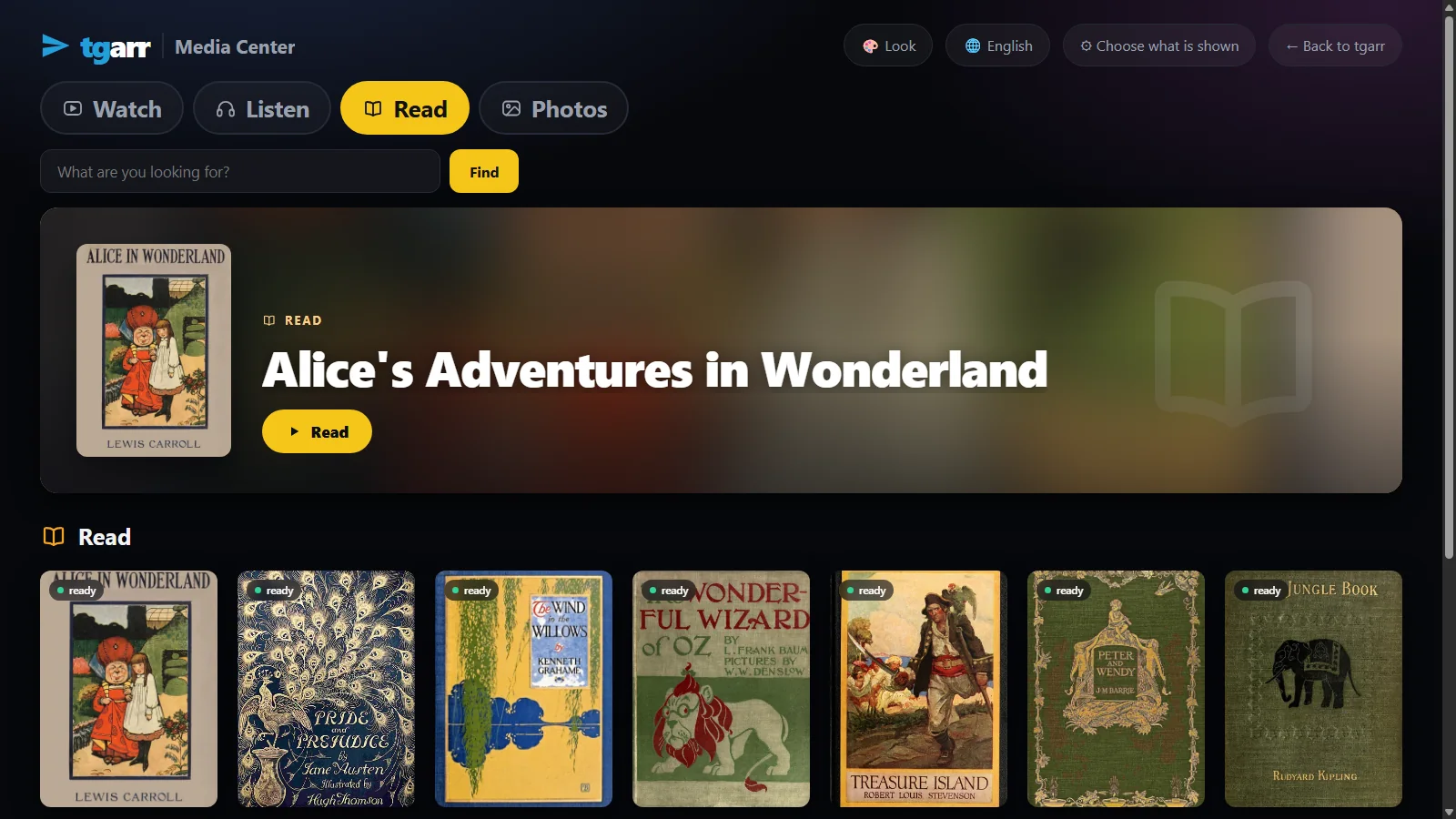
What it isA frame, not a second program
The Media Center, full screen
tgarr is a web page. The app opens its Media Center without a browser around it and hands the remote's keys to the page.
It needs the tgarr at home
Nothing is stored or played by the app itself. It shows the tgarr that runs on your computer or NAS. Install that first.
20 kB, one file of code
One Java file, no libraries. The source is in the tv/ folder of tgarr's repository.
InstallPutting it on the television
The app is not in a store. Download tgarr-tv.apk and put it on the television:
Android TV and Google TV
Send the file to the television - a USB stick, or an app such as "Send files to TV" - and open it with a file manager. The television asks once to allow installing from that app.
Fire TV
The "Downloader" app fetches it from the release's address:
https://github.com/tgarrpro/tgarr/releases/latest/download/tgarr-tv.apkAn early build named tgarr-tv-preview.apk came with 0.5.11 and was signed with a throw-away key. If you have that one, remove it before installing this.
First startHow it finds your tgarr
- It looks by itself. The app asks the other addresses on the television's home network for a tgarr on port
8765. This needs tgarr 0.5.11 or later. - If it finds none, type the address you open tgarr at in a browser -
192.168.1.20is enough. - It remembers. Next time it opens straight at the Media Center. Press Menu for another address, or to load the page again.
The remoteArrows, OK and Back
| Arrows | Move to the nearest thing in that direction. |
|---|---|
| OK | Opens it. |
| Back | Goes back; out of a film playing full screen first. |
| OK on Find | Opens the keyboard, to search. |
| Menu | Another address, or loading the page again. |
The arrows also work in an ordinary browser with a keyboard: the Media Center is the same page everywhere. Add ?tv=1 to its address to have it open with the first item chosen.
The lookCinema
On a television the Media Center starts in Cinema: a dark room and the pictures, made for a screen across the room. If the household has a default look, or this screen chose one of its own, that one is used. All the looks, and the rest of the Media Center.
Who sees whatThe PIN holds on the television too
A television that was not unlocked with the PIN shows the Media Center and nothing else - only what you ticked, with the time rules you set. That is tgarr's rule for every device, and the reason this app shows the Media Center.
HonestlyWhat it does not do
- It is not in an app store. You install the file yourself, as above.
- It does nothing alone. Without a tgarr on the home network there is nothing to show.
- It has not met a living room yet. It was run on an Android TV 14 emulator, not yet on a real television. Tell us how it does on yours.
- It is for Android TV, Google TV and Fire TV. Any other television with a browser can open tgarr's address instead.
- It stays at home. A link that leads away from your tgarr is not followed.
CN=tgarr, SHA-256 1B:4F:42:8E:E4:32:5C:4E:1F:A4:C9:DE:56:41:DB:44:6D:BA:92:95:63:EC:57:E3:4F:7D:6B:D2:C2:A5:33:AF, and so is every later version.InstallPut it on a computer that stays on
Windows 10 / 11
Download one file and double-click it - no terminal. It sets up WSL2, puts tgarr inside and opens the browser when it is done.
macOS
Open the zip and right-click install-tgarr.command → Open. It needs Homebrew; the installer adds Colima and puts tgarr inside. This installer has not yet been run from end to end on a real Mac.
Linux and NAS
One line on Linux:
curl -fsSL https://raw.githubusercontent.com/tgarrpro/tgarr/main/install/install.sh | bashOn Synology, QNAP, Unraid, TrueNAS or CasaOS: two files and docker compose up -d. On a NAS
Television
Android TV, Google TV, Fire TV: this 20 kB app is a frame around the Media Center of the tgarr at home, driven by the remote.
No account of any kind is needed to begin. It takes about 3 GB of disk and 4 GB of memory to spare, and keeps itself up to date. The full instructions.
QuestionsAsked often
Is the app in Google Play or the Amazon Appstore?
No. It is one file, tgarr-tv.apk, on tgarr's releases page on GitHub. You put it on the television yourself; the television asks once to allow installing from the app you opened it with.
Does the television need tgarr installed on it?
No. tgarr runs on a computer or NAS at home. The app is a 20 kB frame around that tgarr's Media Center: it finds the server on the home network, or you type its address once, and it remembers it.
The app does not find my tgarr. What now?
Type the address you open tgarr at in a browser, for example 192.168.1.20. The search works for tgarr 0.5.11 or later on port 8765; a tgarr on another port or behind https has to be typed in. Menu on the remote offers another address at any time.
What can a child do with the remote?
What the Media Center allows. A television that was not unlocked with the PIN shows the Media Center and nothing else, with only what you ticked and with the time rules you set. That is tgarr's rule for every device.
How do I know the file is tgarr's?
It is signed with tgarr's own key: certificate CN=tgarr, SHA-256 1B:4F:42:8E:E4:32:5C:4E:1F:A4:C9:DE:56:41:DB:44:6D:BA:92:95:63:EC:57:E3:4F:7D:6B:D2:C2:A5:33:AF. Every later version is signed with the same key. A file that claims to be tgarr's TV app and is signed by anything else is not.
Has it been tried on a real television?
It was run on an Android TV 14 emulator, not yet on a television in a living room. Tell us on GitHub how it does on yours.